2101 USB Connection Exerciser
The easy way to test and debug driver load/unload problems.
Product
Download Latest Software
Tired of manually plugging/unplugging USB devices to test or debug driver load/unload problems? Are you wearing out the connectors on your development PC? Is your prototype so fragile that plugging and unplugging risks damaging the unit? Want to run connect/disconnect tests overnight?
The MCCI® USB 3.0 Connection Exerciser Model 2101 automatically connects and disconnects a USB 2.0 or 3.2 gen1 host and device under push-button or software control. Connections can be single-stepped or repeated. The manual modes are useful for debugging attach/detach scenarios. QA teams find the automatic repeat modes useful for regression tests.
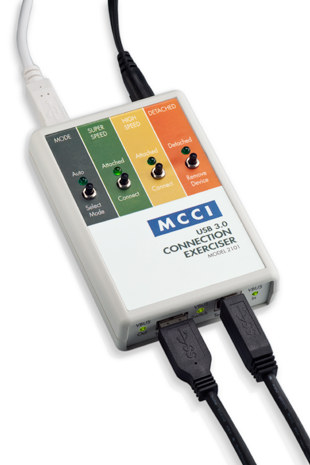
It’s an ideal tool for finding and debugging connect or disconnect bugs in host drivers and devices. Simply connect your host and device to the connection exerciser, supply power, and you’re ready to test. A single button push will connect or disconnect your device. Select “auto” mode to automatically repeat enumeration testing. Connect USB 3.2 Super Speed devices in high-speed mode to test backwards compatibility. Use a test control computer to automatically vary the test cycle time.
Features:
- A single button push connects or disconnects your device from the host.
- Tests low speed, full speed, high speed and super speed devices and hosts.
- An impedance controlled, low loss USB data path. The Exerciser is transparent when in the connected state.
- Data relays are rated to 7 GHz.
- Data lines float when in the disconnected state.
- VBUS and Data signals are connected and disconnected in the same sequence as if connected manually. Real USB connectors have different lengths for VBUS/ground versus D+/D-. This timing is mimicked.
- The ground connection between host and device is never broken.
- Connection time can be controlled down to 10 ms.
- Device Under Test (DUT) VBUS is optionally configurable for flow-through or buffered operation. (In flow-through mode, your host provides the power to the device; in buffered mode, the connection exerciser provides power to your device. This is very useful if the host has a limited power supply or is battery powered.)
- Can be powered from any of these three sources:
- External 5 V power supply.
- Control PC VBUS connection.
- Host Under Test (HUT) VBUS power supply (optional).
- No drivers need to be installed on the Control PC. The OS native HID drivers are used. The Control PC can be running Windows, macOS, or Linux (x86, amd64, or ARM – even a Raspberry Pi).
Block Diagram
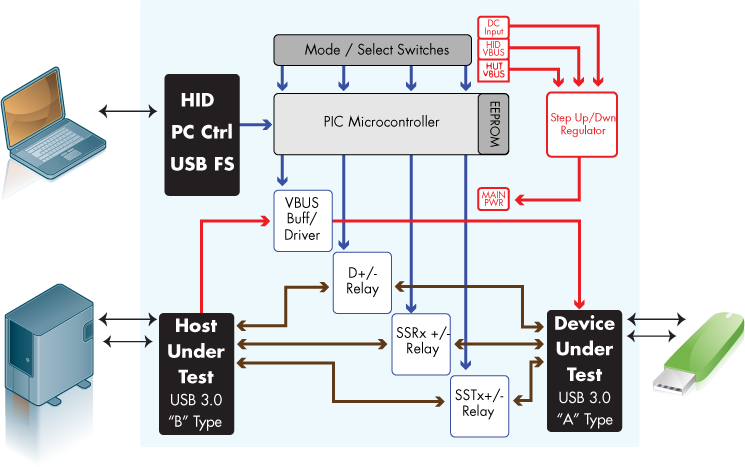
Table 1. Specifications
|
Mechanical
|
|
| Size H x W x D | 111.25 x 75 x 25.2 mm (4.38 x 2.95 x .99”) |
| Weight | 9 oz |
|
Electrical
|
|
| Power dissipation (all relays on; VBUS pass-through mode) | 1.75 W |
| Max Device VBUS current switch (VBUS pass-through mode) | 900 mA |
| Max Device VBUS current (VBUS buffer mode) | 900 mA |
|
Connectors
|
|
| To UUT Host (on case front) | USB 3.2 Std “B” |
| To UUT Device (on case front) | USB 3.2 Std “A” |
| DC Input (on case back) | 2.1 mm round, center positive |
| To Control PC (on case back) | USB 2.0 Std “B” |
|
LED Indicators
|
|
| VBUS IN (on case front) | On when Host VBUS is detected |
| Connect (on case front) | On when Host is Connected to Device |
| VBUS OUT (on case front) | On when VBUS is supplied to Device |
| Main Power (on case back) | On when Exerciser is fully powered |
| PC Link (on case back) | On when Control PC has enumerated Exerciser |
| Soft LEDs 1 through 4 (on case top) | Used by Exerciser FW for various functions (see User Manual) |
|
Mode Buttons
|
|
| Momentary soft switches 1 through 4 (on case top) | Used by Exerciser FW for various functions (see User Manual) |
|
Power Supply
|
|
| DC supply Input | 100 to 240 V AC; 50 to 60 Hz |
| DC supply Output | 5 V DC, 2.5 A max |
|
Cables
|
|
| Control PC | 4 foot STD “A” to STD “B” USB 2.0 |
| Patch Cables | 1 foot STD “A” to STD “B” USB 3.2 gen1. |
Kit Contents
- Model 2101 MCCI USB 3.0 Connection Exerciser
- International Power Supply
- USB 3.2 Patch Cable (for use from HUT to 2101 or 2101 to DUT) . The Connection Exerciser supports low speed, full speed, and high speed devices, but the patch cable uses a SuperSpeed B connector. If your product has a regular B connector, or a mini-B or micro-B connector, you’ll need to supply your own patch cable(s).
- USB 2.0 Cable (for use from 2101 to Control PC)
Software and Documentation Downloads
Although no software is needed for standalone operation, MCCI provides scripting support for Windows, OS X, and Linux (x86, amd64 and ARM). The most recent software release is available as a free download. One distribution includes software for all supported platforms.
Check out the MCCI Cricket UI, an interactive cross-platform GUI for testing USB connections with the Model 2101 USB connection exerciser.